Introducing Sense
Real-time energy usage data built into your new meter
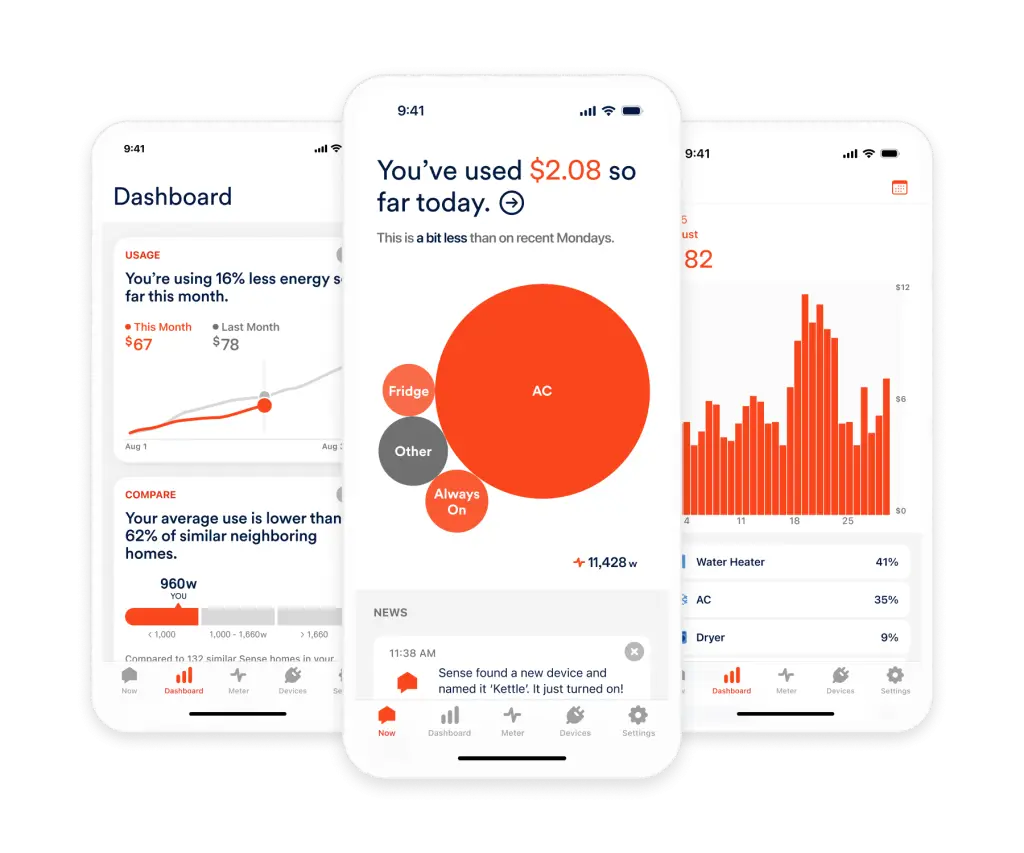
Tipmont has partnered with Sense to give you real-time energy insights directly from your electric meter. Sense offers real-time electric usage data to help you save money on your electric bill.
Sense is included with the new meters Tipmont is deploying across our service territory.

Real-Time usage
Getting started
- See if you're eligible
Tipmont is deploying new meters across its electric service area. You must have the new meter to use Sense.
- Download the Sense app
Once confirmed eligible, the app is available for both iOS and Android; the Sense app is your dashboard to your home’s electric usage.
- Connect to your Wi-Fi
First, create your Sense account. Make sure your at home and close to your electric meter. You’ll need an up-to-date Wi-Fi router and a strong, stable signal between your electric smart meter and the router to ensure reliable performance.
- Share a few home details
Each device using electricity in your home has a unique electrical signature. Sense uses machine learning to identify those devices and measure their real-time energy usage. You can also tell Sense about your home to help the recognition process.
- Analyze usage over time
See which devices are driving usage as well as how your monthly use is tracking and how that compares to previous months. The detailed breakdown of your home’s energy use and individual devices will help you identify opportunities to save.
Set your electric rate
One of the first things you should do in the Sense app is set your electricity rate to get accurate estimates of your electricity usage costs.
Tipmont’s residential rate is 12.26 ¢ per kWh.
Sense Energy monitoring
Frequently Asked Questions
Tipmont has partnered with Sense to give you real-time energy insights directly from your new meter.
Sense is a mobile app for iOS and Android that helps you understand and manage your home’s energy use in real time —directly from your phone or tablet. Sense analyzes your home’s electrical patterns and provides you with insight into real-time energy usage. Over time, it will identify some specific appliances based on their unique electrical signatures.
Here’s what to expect:
- Within the first week, Sense may begin identifying appliances that frequently cycle on and off — like refrigerators, dryers or microwaves.
- Over the next few weeks to months, Sense will gather enough contextual data to recognize other devices operating in more complex or irregular ways.
Each time Sense isolates a device, it will ask you to name it based on your knowledge of your home.
Sense is built into your new meter and uses your home’s Wi-Fi connection to make real-time usage data available to view on the Sense app from your mobile device.
Visit this page for information on Wi-Fi requirements.
No. Sense will work with any home internet service that meets Sense Wi-Fi requirements.
If you have Tipmont internet service and need help extending your Wi-Fi signal to your electric meter, please contact our support team for help.
Sense requires a stable Wi-Fi connection to your electric meter for operation. You can run a connection test in the Sense app to test the Wi-Fi signal strength at your meter.
If you have Tipmont internet service and encounter Sense connection issues, please call Tipmont support at 800-726-3953, extension 4, or email help@tipmont.com.
If your monitor frequently goes offline, check this guide for tips or contact Sense support for help.
Device detection in your home happens gradually. Sense learns the unique electrical signatures of your devices over time, so you may see a mix of devices in different stages of detection in your Devices list.
In some cases, you might notice a difference between what you see in your Sense app and what appears on your electric bill.
While any discrepancies should be minor, your electric usage and subsequent bill will be based on the data reported in SmartHub. If you notice a large discrepancy, please contact Sense support.
Both Sense and SmartHub use data from your meter to track electric use in your home.
SmartHub allows you to review your usage data on a daily, monthly and annual basis. It is connected to Tipmont’s billing system and used to bill you each month based on your usage.
Sense also uses data from your meter but shows your usage in real time and identifies energy usage for specific devices.
Any discrepancies between the two systems should be minor. Please notify Tipmont if you see large usage discrepancies.
No. Solar monitoring is not yet available for Sense-enabled electrical meters.
Yes. There is no cost to use Sense from your Tipmont-enabled meter.
Tipmont signed a three-year contract with Sense to provide this functionality from your new meter. We hope that our members use this technology to understand their energy use and lower their energy bills.
Tipmont will evaluate member adoption throughout the contract and, hopefully, extend the contract assuming it proves to be a useful tool for our members.
Sense is committed to safeguarding your data and provides full control over what you choose to share.
- AES-256 encryption offers a leading industry standard
- Multi-factor authentication is supported and encouraged for all users
- Support staff only accesses your data with your explicit permission and only as needed to resolve specific issues
- Sense does not share your data with third parties without your explicit consent
That is completely in your control. If you do not wish to use Sense, it will remain disabled on your meter.
Sense is not required to bill you for energy usage. It will not collect data or perform any functionality without your explicit consent.
Your Sense Home app is uniquely tuned to your home and its electrical setup, devices and appliances. When you disconnect or transfer service, Tipmont will reset your meter. This reset will erase all data, so if you want to compare energy costs between homes, be sure to first download your data from the previous home.
In your new home, if there’s a Sense-enabled smart meter, you can connect to it using your mobile phone to set up a new system.
For Sense technical support, please visit help.sense.com.
For questions about your meter, electric rates or your bill, please contact Tipmont.
real-time energy monitoring
Sense Tips and Tricks
The Sense app helps you monitor your home’s use of electricity overall, and as its machine learning starts detecting devices, you can see how they contribute to your home’s energy use overall.
Use these tips and tricks to maximize Sense in your home!
- Unlock real-time electric usage
- Identify your biggest electric costs
- Learn about your lights and more using Watt Check
- Analyze your standby usage
- Dive into detailed usage – both overall and by device
- Monitor your home from anywhere with custom alerts
- Calculate whether it's time to replace an old appliance
- Find hidden energy vampires